5 Plugins to Display ACF Repeater Field in Elementor

Table of Contents
Displaying standard ACF fields in Elementor is relatively straightforward, but Repeater fields are different. Elementor doesn't natively provide a complete way to loop through ACF Repeater rows, so displaying them usually requires an additional plugin or a custom solution.
The available plugins approach this in very different ways. Some add dedicated Elementor widgets, some work with Elementor Loop templates, while others handle the data and layout separately before placing the result inside Elementor.
For this comparison, we tested five different approaches using the same ACF Repeater field and the same content. The goal wasn't to compare every feature each plugin offers, but to see how each one handles a common task: displaying several ACF Repeater sub-fields together in Elementor.
If you're new to repeaters, the ACF Repeater documentation explains how the field works. ACF also has a useful guide covering ACF Repeater fields and Elementor.
Introduction
The Test Scenario
We used the same simple example for every plugin: a Staff Members ACF Repeater containing three sub-fields:
- Staff Photo
- Name
- Position
The repeater was populated with three staff members and tested using WordPress, Elementor and ACF Pro.
We focused on the practical experience: how the repeater is connected, how its sub-fields are displayed, how much control we have over the resulting layout, and how easy the workflow would be to maintain on a real WordPress project.
Plugins Overview
| Plugin | Repeater approach | Free or paid | Best suited for |
|---|---|---|---|
| Advanced Views Pro | Reusable data-driven Layout | Pro required for repeaters | Reusable structured layouts with full markup control |
| Dynamic Content for Elementor | Dedicated Elementor ACF Repeater widget | Paid | Elementor-focused dynamic content workflows |
| Repeaterly | Dedicated Elementor repeater widgets | Free + Pro | Simple repeater displays built directly in Elementor |
| Unlimited Elements | Prebuilt Elementor repeater widgets | Free + Pro | Repeater data that fits an existing widget layout |
| Dynamic ACF Repeater for Elementor | Elementor Loop Item and Loop Grid | Free + Pro | Elementor Pro users who prefer Loop templates |
The plugins vary considerably in scope. Some are dedicated repeater solutions, while others are larger Elementor or WordPress toolkits. We therefore focused only on how each plugin handled this specific ACF Repeater example rather than comparing their complete feature sets.
1. Advanced Views Pro
Intro
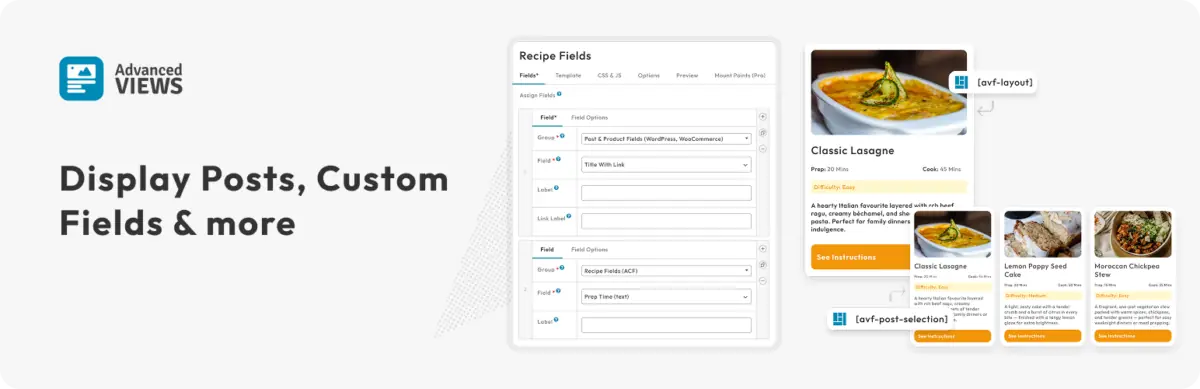
Advanced Views Pro handles ACF Repeater fields outside Elementor itself. Instead of configuring individual repeater fields inside Elementor widgets, we create a reusable Layout and select the repeater and its sub-fields there.
The selected fields are made available inside the Layout template, and a starter template is generated automatically. We can then control the HTML structure and presentation before placing the finished Layout inside Elementor using a shortcode.
This makes Elementor primarily responsible for placement and surrounding page design, while Advanced Views handles the structured data and repeater output.
Pros
- Repeater fields and sub-fields are selected once rather than manually mapped to individual Elementor widget settings.
- Full control over the HTML and structure of each repeater row.
- Generates a starter template from the selected fields.
- Layouts can be reused in Elementor or elsewhere on the site.
- Handles the underlying ACF and WordPress data retrieval automatically.
Cons
- ACF Repeater support requires Advanced Views Pro.
- The repeater layout is created outside Elementor, which may feel less familiar to users who prefer an entirely visual Elementor workflow.
- Getting full control from the Layout system requires some comfort with HTML and template markup.
Usage notes
For our Staff Members test, we selected the repeater and its Staff Photo, Name and Position sub-fields in a Layout. The fields were then available together in the generated template, where we could define the markup for one staff member and repeat it for every row.
The main difference from the other plugins in this comparison is that we weren't designing the repeater directly inside Elementor. Once the Layout was complete, Elementor was used to place the finished output on the page.
Best suited for
WordPress professionals, freelancers and agencies working with structured or reusable content who want precise control over the resulting markup and are comfortable working with templates.

2. Dynamic Content for Elementor
Intro
Dynamic Content for Elementor is a broader Elementor extension that includes tools for working with dynamic data from ACF and other custom-field systems.
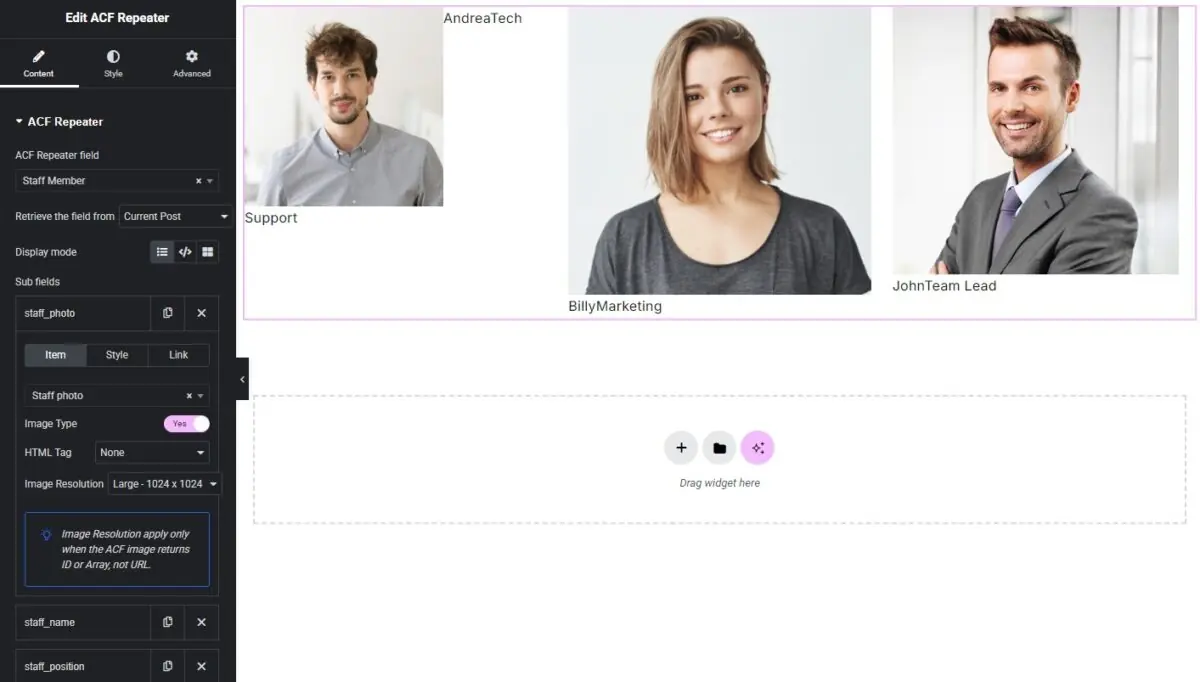
For ACF Repeaters, it provides a dedicated ACF Repeater widget inside Elementor. Repeater sub-fields can be added individually and selected from searchable field controls, keeping the workflow inside the Elementor editor.
Pros
- Provides a dedicated ACF Repeater widget inside Elementor.
- Sub-fields can be selected using searchable controls rather than manually entering field IDs.
- The workflow remains inside Elementor.
- Part of a much broader dynamic-content toolkit.
Cons
- There is no free WordPress.org version.
- Individual repeater sub-fields are configured separately inside the widget.
- The sandbox limited access to the underlying ACF setup, which made our first test difficult to reproduce completely.
Usage notes
Inside Elementor, the ACF Repeater widget was easy to find and allowed us to add repeater sub-fields individually. The field selector itself was straightforward and searchable, and only the image needed the 'image type' turned on.
Best suited for
Elementor users who want to configure repeater content inside the page builder and who are also likely to use the plugin's wider dynamic-content features.
3. Repeaterly
Intro
Repeaterly is focused specifically on connecting ACF content with Elementor. It includes dedicated widgets for displaying repeater data and offers both free and Pro versions.
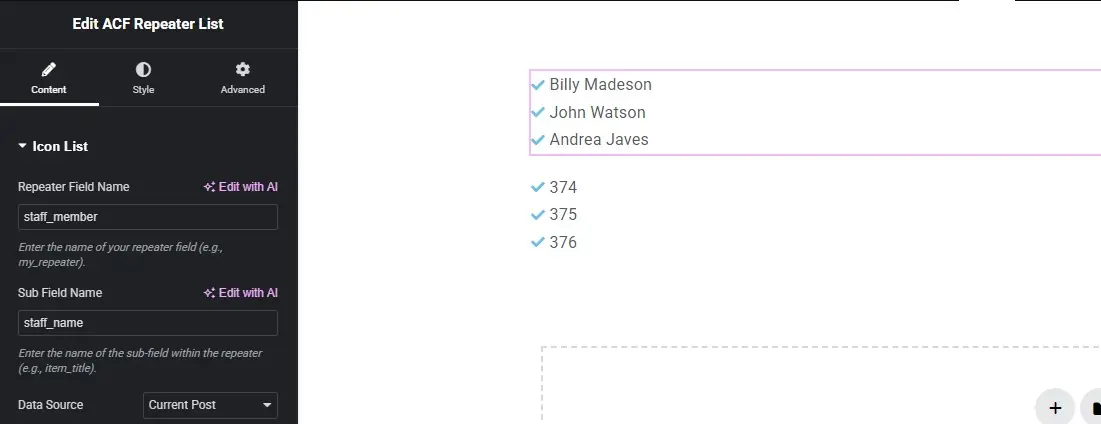
For our test, we used the free version and the dedicated ACF Repeater List widget. The repeater and sub-field names are entered manually rather than selected directly from ACF.
The free version is suitable for relatively simple output, while displaying multiple sub-fields and more advanced layouts requires Repeaterly Pro.
Pros
- Includes a dedicated ACF Repeater List widget.
- Works directly inside Elementor.
- The basic workflow is straightforward once the correct widget has been identified.
- A free version is available for testing simple repeater output.
Cons
- Repeater and sub-field names have to be entered manually.
- The free Repeater List widget only supports a single repeater sub-field.
- Multi-field repeater layouts require Repeaterly Pro.
- We weren't able to render our ACF Image field correctly during the free-version test.
Usage notes
We used Repeaterly’s dedicated ACF Repeater List widget and connected it by entering the repeater field name manually.
The free version only allowed us to display a single repeater sub-field, so it wasn’t enough for our Staff Members example containing a photo, name and position. Displaying multiple sub-fields requires Repeaterly Pro.
We also tested the Staff Photo field. The default ACF Array return format produced no visible image, while switching to Image ID output the attachment ID rather than the image itself.
Best suited for
Elementor users with relatively simple repeater requirements, or users who are comfortable moving to Repeaterly Pro when they need multiple sub-fields and more advanced layouts.
4. Unlimited Elements

Intro
Unlimited Elements is a large collection of Elementor widgets rather than a plugin focused specifically on ACF Repeaters.
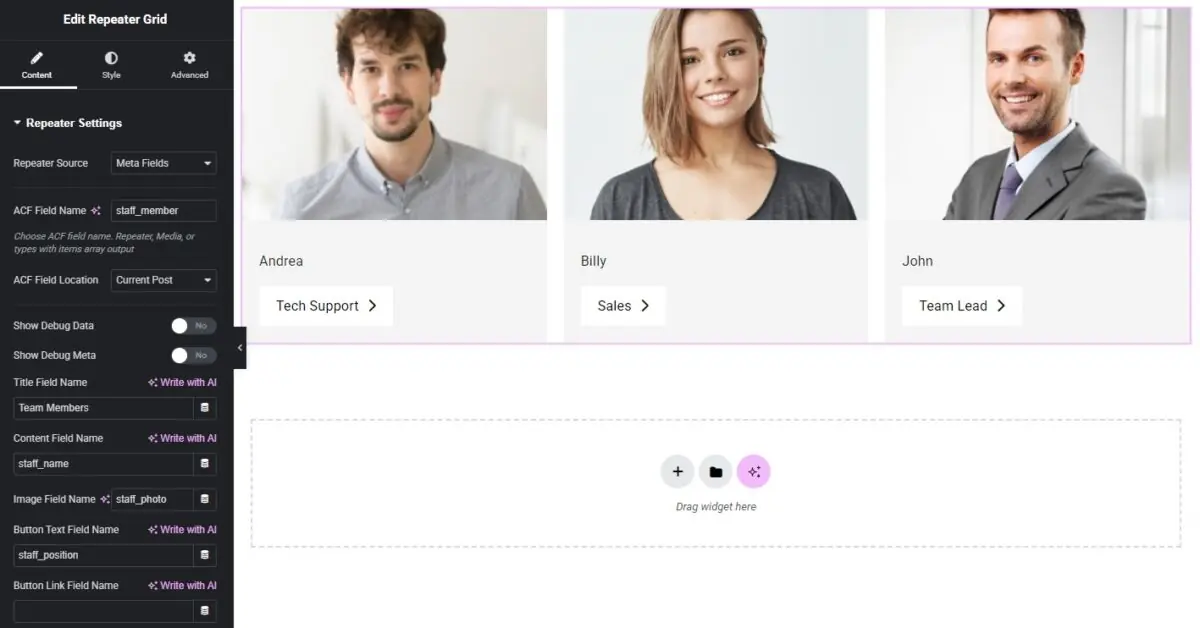
For our test, we used the Pro Repeater Grid widget, which can use an ACF Repeater as its data source and display the repeater rows in a configurable grid.
The widget uses predefined field roles such as title, content, image and button. Instead of designing each repeater row from scratch, we map our ACF sub-fields to the fields provided by the widget and then customise the grid using its Elementor styling controls.
Pros
- Provides a dedicated Repeater Grid widget for displaying ACF Repeater content.
- Supports multiple repeater sub-fields, including image fields.
- The complete setup and styling workflow takes place inside Elementor.
- Includes controls for grid columns, spacing and individual item styling.
- Part of a much larger collection of Elementor widgets.
Cons
- The Repeater Grid widget requires Unlimited Elements Pro.
- Repeater and sub-field names need to be entered manually.
- The available content structure is based around predefined fields such as title, content, image and button.
- Styling controls are available, but the actual item structure is relatively fixed. In our test, the Position field had to be mapped to the button label because there wasn't a more suitable field available.
Usage notes
The initial setup was relatively straightforward. We found and installed the Repeater Grid widget, added it to our Elementor page, selected Meta Fields as the repeater source, and entered the repeater field name.
From there, we mapped our Staff Photo, Name and Position sub-fields to the fields provided by the widget. The repeater content displayed successfully, including the image field.
The main limitation was the predefined item structure. While the grid includes useful styling controls, we couldn't find a way to freely change the markup or add another simple text field. For our Staff Members example, this meant using the button label field to display the Position value.
Best suited for
Elementor users who want a ready-made grid for displaying ACF Repeater content and whose field structure fits the widget's predefined image, title, content and button fields.
5. Dynamic ACF Repeater for Elementor
Intro
Dynamic ACF Repeater for Elementor takes an Elementor Loop-based approach. Instead of adding its own repeater layout widget, it allows ACF Repeater rows to be used as the data source for Elementor Loop Items and Loop Grids.
This means each repeater row can be designed using Elementor's existing Loop template system, while the plugin adds the repeater-specific settings and dynamic tags needed to connect the ACF data.
The plugin itself is available for free from WordPress.org, but Elementor Pro is required because the workflow relies on Elementor's Loop Item and Loop Grid features. The plugin also provides documentation covering the setup process.
Pros
- Uses Elementor's existing Loop Item and Loop Grid workflow rather than introducing a separate repeater widget.
- Provides considerably more freedom over the structure and design of each repeater row.
- Individual repeater sub-fields can be placed wherever needed within the Loop Item.
- Image and text fields worked correctly in our Staff Members test.
- The free version of the plugin was sufficient for our basic repeater example.
Cons
- Elementor Pro is required for the Loop Grid workflow.
- The initial setup has several steps and wasn't immediately obvious on our first attempt.
- Each repeater sub-field needs to be connected individually using Elementor's Dynamic Tags.
- Understanding where the repeater settings live inside the Loop Item can take some time if you're unfamiliar with Elementor's Loop system.
Usage notes
The most difficult part of the setup was creating the Loop Item and finding the repeater-specific settings inside the Loop Item editor. We first selected our Staff Members repeater in the Loop Item settings.
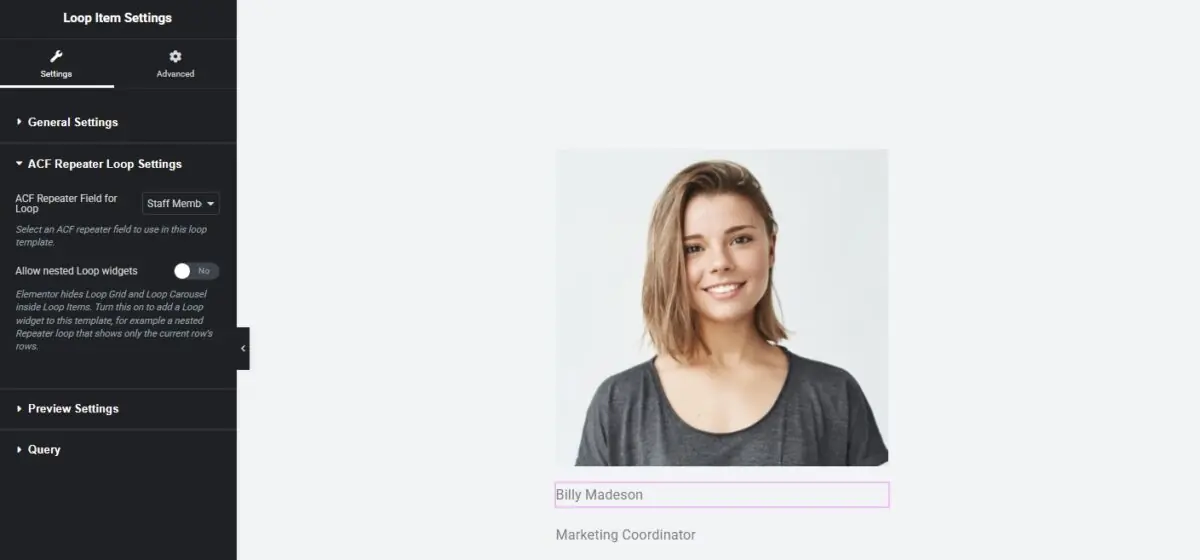
We then designed a single staff card using normal Elementor widgets. For each field, we selected Dynamic Tags, chose the relevant ACF Repeater field type, and connected it to Staff Photo, Name or Position.
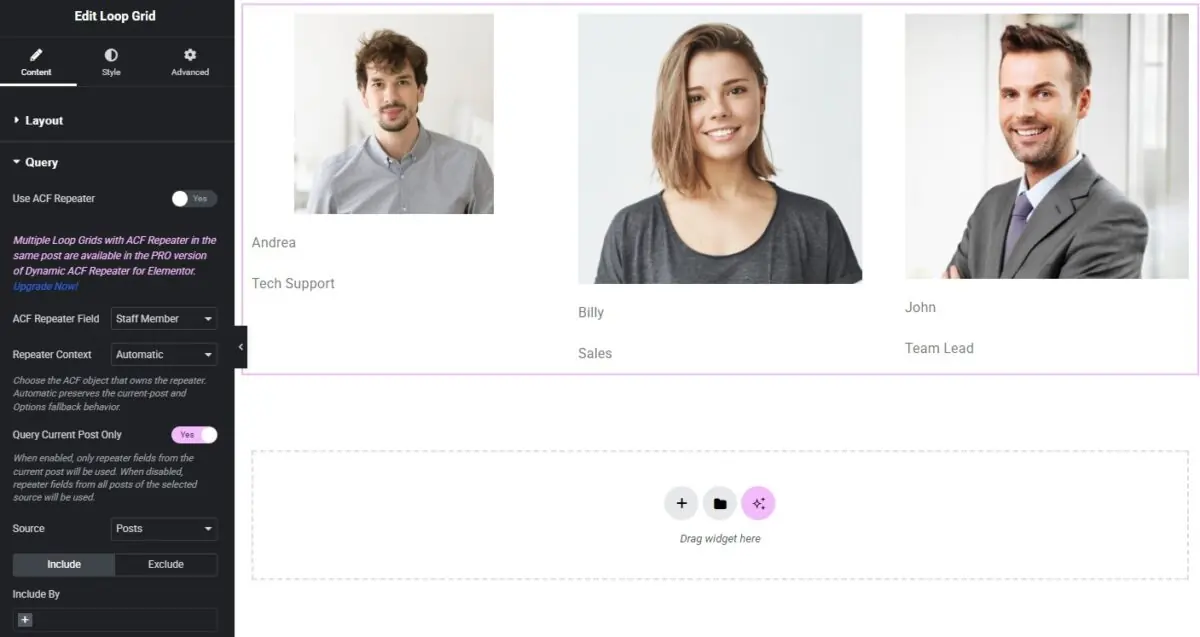
Once the Loop Item was configured, the rest of the process was more straightforward. We added Elementor's Loop Grid widget to the page containing our repeater data, selected our Loop Item template and enabled the ACF Repeater query.
All three repeater rows displayed correctly. Compared with widgets that provide predefined title, content or button fields, this approach gave us much more control over the final layout because we could decide exactly where each repeater sub-field should appear.
Best suited for
Elementor Pro users who are comfortable working with Loop Items and Loop Grids and want more control over the structure and design of each ACF Repeater row.
Which ACF Repeater Plugin Should You Choose?
After testing all five plugins with the same Staff Members repeater, the biggest difference wasn't whether they could work with ACF Repeater fields. It was how they expected us to build and control the final layout.
Advanced Views Pro takes the most separate approach. The repeater fields are selected in a reusable Layout, where we control the markup and structure before placing the finished output inside Elementor. This keeps the repeater display independent from the page builder, but requires some comfort with templates and HTML.
Dynamic Content for Elementor keeps the workflow inside Elementor and provides a dedicated ACF Repeater widget. Its Subfields mode offers a relatively direct way to select and display multiple repeater fields without creating a separate Loop Item.
Repeaterly is more narrowly focused on connecting ACF and Elementor. The free version works for simple repeater output, but our Staff Members example quickly reached its limitations because displaying several sub-fields together requires Repeaterly Pro.
Unlimited Elements was relatively quick to configure using its Pro Repeater Grid widget. It successfully displayed our image and text fields, although the predefined title, content, image and button structure meant we had less control over how those fields were arranged.
Dynamic ACF Repeater for Elementor required the most understanding of Elementor's Loop system during initial setup, but once configured it provided much more freedom over the design. Each repeater row becomes an Elementor Loop Item, so we could decide exactly where the Staff Photo, Name and Position should appear. The plugin itself is free for this use case, although Elementor Pro is required.
There isn't one approach that will suit every project. The choice largely comes down to the workflow you prefer.
If you want the repeater layout to remain separate from Elementor and be reusable elsewhere, Advanced Views Pro offers that approach. If you prefer working entirely inside Elementor, Dynamic Content for Elementor provides a dedicated repeater widget, while Dynamic ACF Repeater makes use of Elementor's existing Loop Item and Loop Grid system.
For quicker, more predefined layouts, Unlimited Elements can work well when your repeater fields fit the structure of its existing widgets. Repeaterly can handle simpler requirements in its free version, with more complete repeater layouts available in Pro.
The important distinction is therefore not simply which plugin supports ACF Repeaters, but how much control you want over the layout, where you want to build it, and how much additional tooling the workflow requires.
We tested each plugin using the same Staff Members repeater so the differences were based on the practical setup rather than feature lists alone. We'll continue updating the comparison as the plugins and their repeater workflows change.
Thank you for reading! to our monthly newsletter to stay updated on the latest WordPress news and useful tips.

Stuck with development or facing an issue?
WPLake offers affordable on-demand website development and design.
No matter the size of your project - contact us now, and we'll get it done for you!
Related articles
Content links (18)
About the Author